Animated Funnel Chart Generator
Show a funnel and exactly where people drop off. Export as PNG, SVG, GIF or MP4.
Free to try · No design skills · Ready in about two minutes
Trusted by 1,198 users, including people at
 ByteDance
 Arizona State
 Fox
Fox UT Austin
 Roche
Roche Tulane
 United Airlines
 Clemson
 NHS
NHS Ayming
 Marquette
 Kent State
 Ray White
 UC Riverside
 CBA
CBA Illinois Tech
 Venngage
 Hofstra
 House of Communication
 IIT Madras
 Sotherly Hotels
 Zenus.ai
Overview
What is a funnel chart?
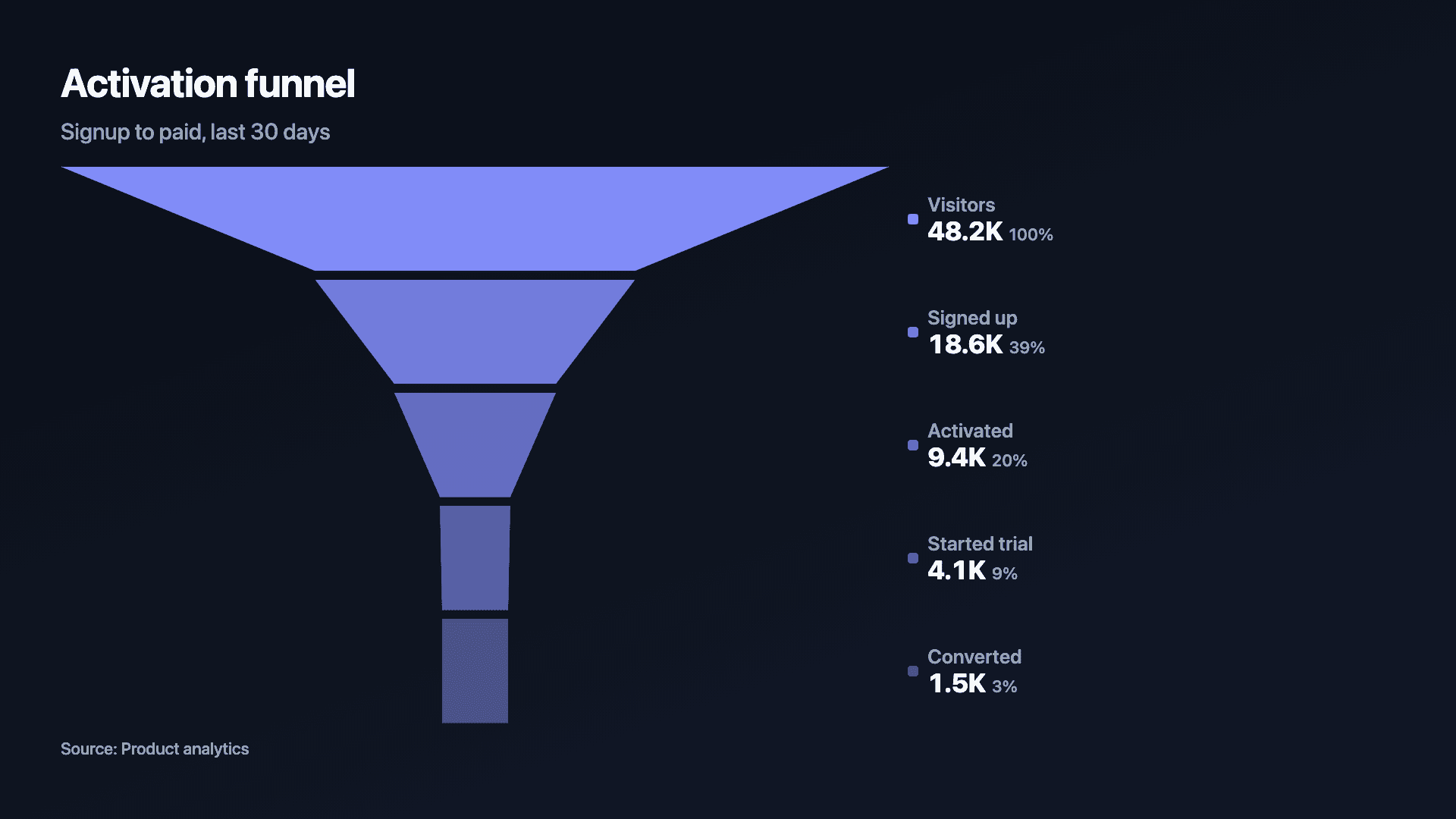
A funnel chart visualises how a number shrinks as people move through the stages of a process, visitors to signups to activated to paid. Each stage is a band, and because each band is narrower than the one above, the drop-off between steps is impossible to miss. It answers the question every growth and sales team asks: where are we losing people?
The funnel works because it shows two things at once: the absolute count at each stage, and the shape of the leakage. A funnel that pinches sharply at one step points straight at the bottleneck. That is far more persuasive than the same numbers in a table.
Reochart animates each stage narrowing into the next, so a conversion story unfolds step by step, ideal for a growth update, a sales review or a fundraising deck. Export as MP4, GIF, PNG or SVG, on your own brand on Pro.
How it works
How a funnel chart works
Stages are listed top to bottom from the largest count to the smallest, and each band's width is drawn in proportion to its value. The step-to-step narrowing is the drop-off, and the percentage that survives each step is the conversion rate.
Order matters: a funnel assumes each stage is a subset of the one above it. If your stages are not sequential (they do not feed into each other), a bar chart is the honest choice instead.
Examples
Example funnel charts
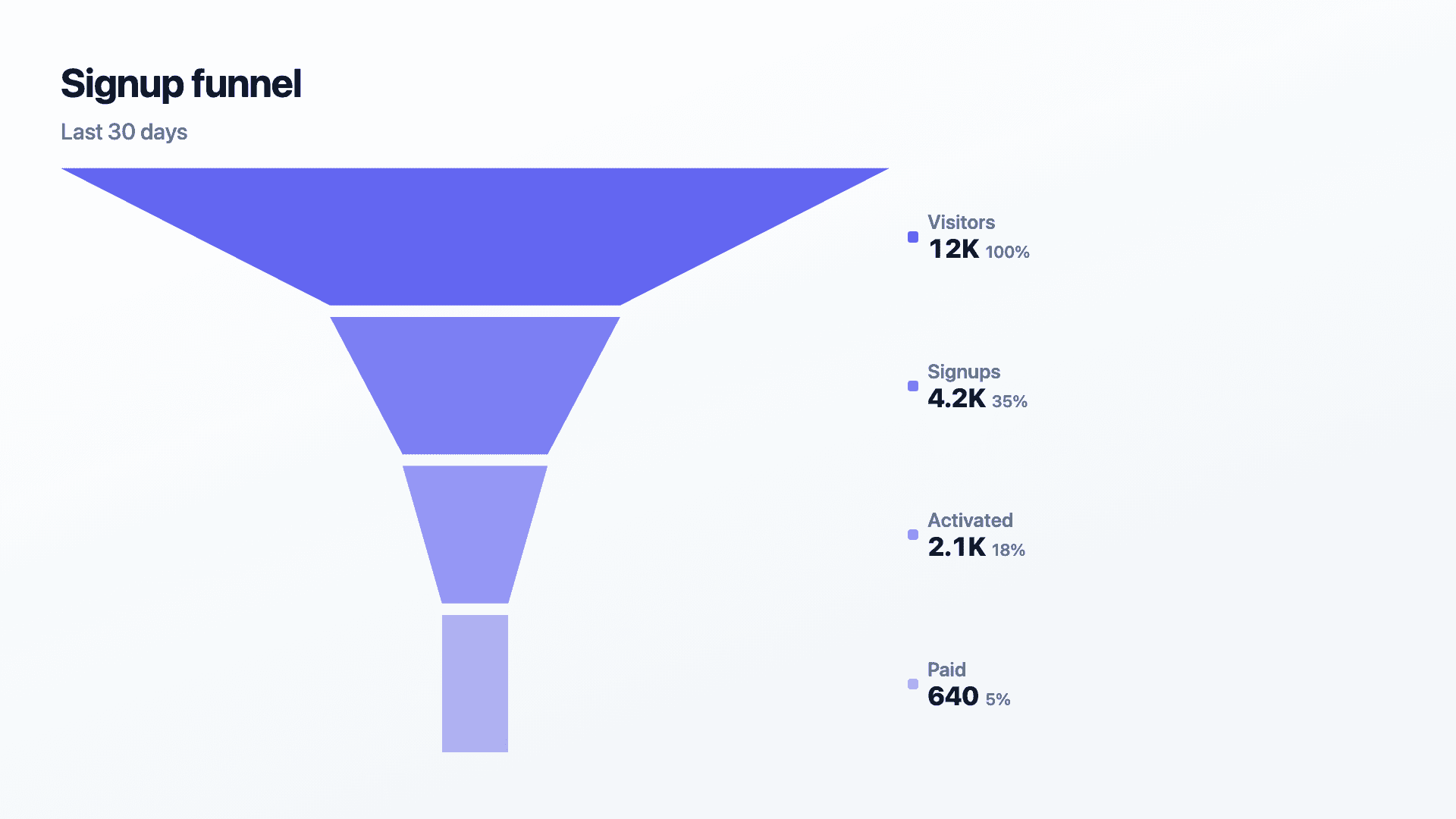
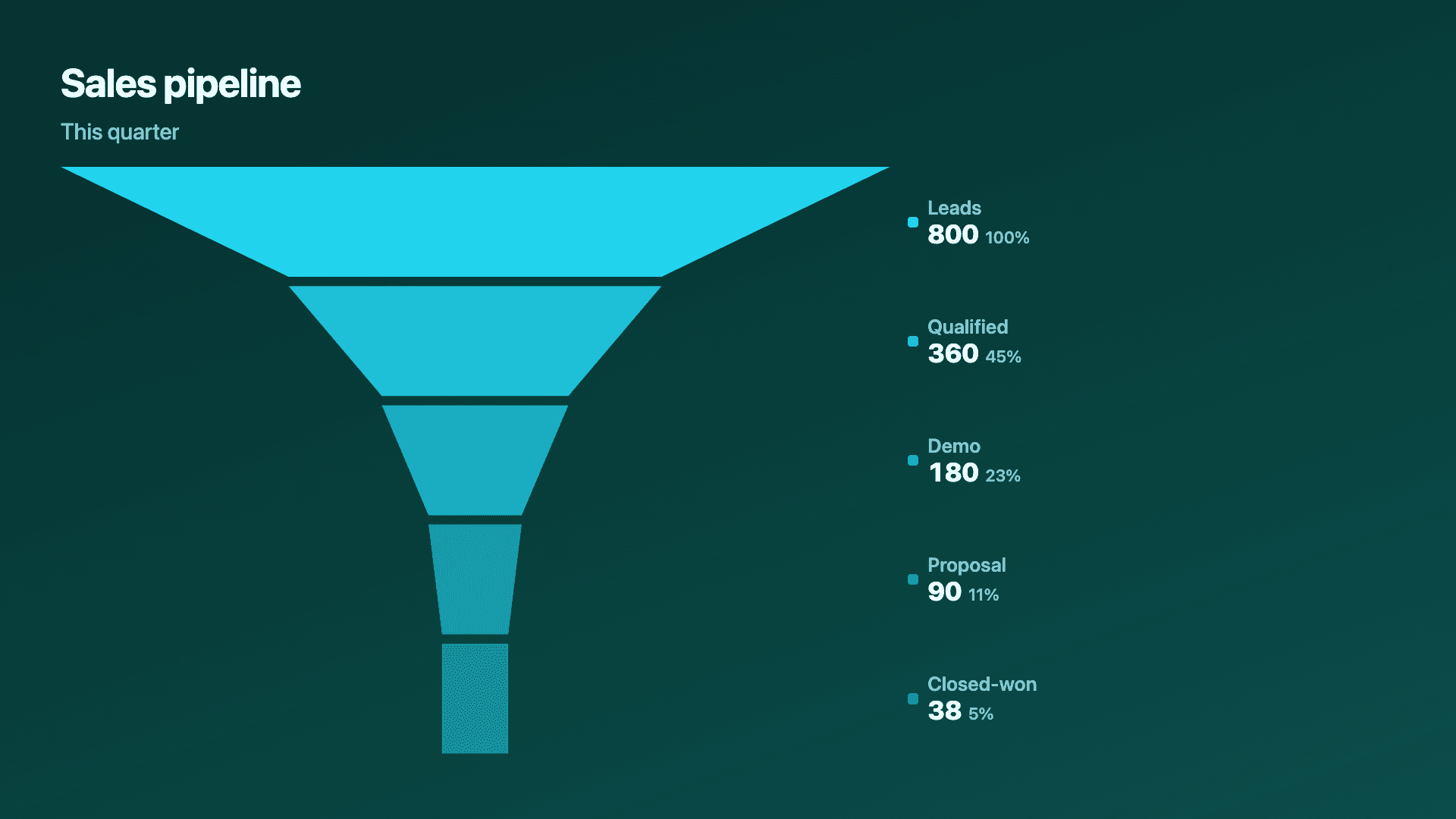
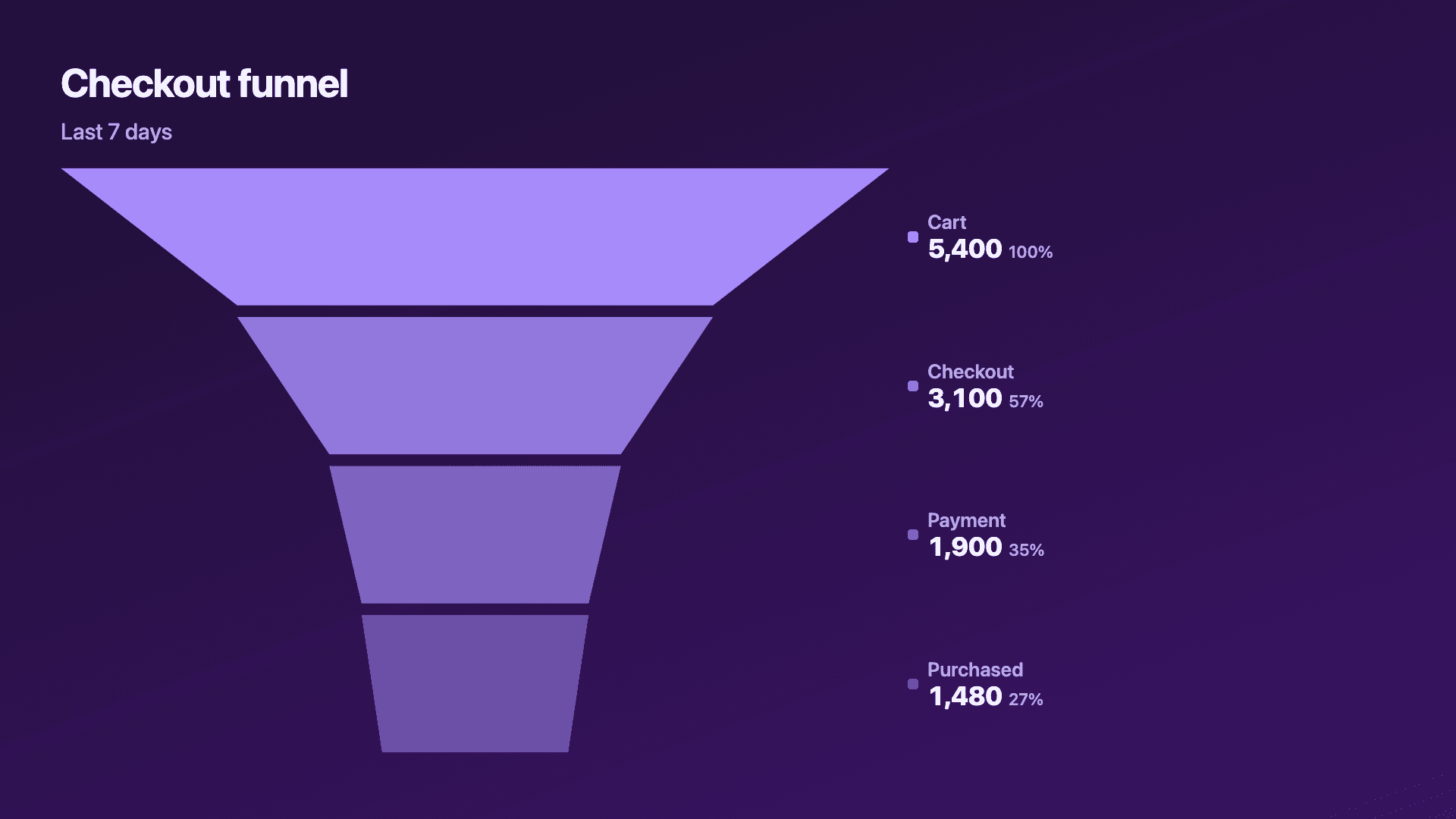
Real charts made in Reochart, each with its own data and theme. They animate automatically as you scroll.
Good fit
When to use a funnel chart
- ✓Marketing or sales funnels
- ✓Signup to activation flow
- ✓Checkout or onboarding drop-off
- ✓Hiring pipeline stages
- ✓Any sequential conversion process
Reach for something else
When not to use a funnel chart
- ✕Your stages are not sequential, if one does not feed the next, use a bar chart.
- ✕A later stage can be larger than an earlier one, that breaks the funnel metaphor.
- ✕The flow branches into more than one outcome (e.g. converts, bounces, or signs up from several sources), a sankey diagram shows that branching in one picture; a funnel can only show a single narrowing path.
- ✕You are comparing categories rather than a flow, use bars.
- ✕You only have two stages, a simple before/after or a counter is clearer.
Compare
Funnel chart vs other charts
Funnel vs the alternatives.
| Chart type | Best for | Avoid when |
|---|---|---|
| Funnel | Drop-off through sequential stages | Non-sequential categories |
| Bar / column | Comparing independent stage counts | Emphasising step-to-step loss |
| Waterfall | What added and subtracted to a total | Simple top-to-bottom conversion |
| Horizontal bar | Ranked stage counts | Showing the narrowing flow |
Your data
What data you need
One row per stage, ordered widest (top) to narrowest (bottom). Paste from a sheet or import a CSV. 3 to 6 stages reads best.
| Stage | Value |
|---|---|
| Visitors | 12000 |
| Signups | 4200 |
| Activated | 2100 |
| Paid | 640 |
Step by step
How to make a funnel chart
Drop your numbers in, or import a CSV.
Choose the chart, theme and animation speed.
Tune colours, labels and add your brand.
Download MP4, GIF, PNG or SVG.
Best practices
Get it right
- ✓Order stages largest to smallest, top to bottom.
- ✓Label the count at each stage so the drop-off is concrete.
- ✓Keep to 3-6 stages so each step is readable.
- ✓Use it only for genuinely sequential steps.
- ✕Mix in stages that are not subsets of the one above.
- ✕Add so many stages that the bands get thin and unreadable.
- ✕Imply a funnel when the numbers are just categories.
- ✕Forget to show the conversion percentages if they are the point.
Watch out
Common mistakes to avoid
A funnel implies each stage flows from the last. If they do not, it misleads, use a bar chart.
If a lower stage is bigger than an upper one, the metaphor breaks. Re-check the data or pick another chart.
Beyond about six, bands get thin and the story is lost. Group minor steps.
The drop-off is the point. Show the count, and ideally the conversion percentage, at each step.
Why Reochart
Built for sharing, not just charting
- ✓No design skills required
- ✓Animated MP4 and GIF exports
- ✓PNG and scalable SVG too
- ✓Your brand colours and logo (Pro)
- ✓Paste from a sheet or import a CSV
- ✓Presentation and feed ready in minutes
FAQ
Frequently asked questions
What is a funnel chart?
A funnel chart is a data visualisation that shows how a population moves through a sequence of stages, with each stage represented as a horizontal band whose width is proportional to the count or percentage remaining. As you move down the funnel, the bands narrow to reflect attrition — people who did not proceed to the next step — which makes drop-off between stages immediately visible. Funnel charts are the standard way to visualise conversion: how many website visitors start a sign-up form, how many complete it, how many verify their email, how many activate a feature. They are also used for sales pipelines, hiring processes, and any other sequential workflow where drop-off matters. The chart's strength is showing where the biggest leaks are, not just the final conversion rate, so you can prioritise where to improve.
Is a funnel chart the same as a conversion funnel or a sales funnel?
The chart and the concept share a name but are different things. A conversion funnel or sales funnel is the process itself, the stages a person moves through from first visit to purchase. A funnel chart is the visual used to show that process, with each stage drawn as a band whose width matches its count. This page builds the chart, and it works for any staged process, hiring pipelines and onboarding flows included, not only sales.
What data do I need?
A label and a value for each stage, ordered from the widest (top) to the narrowest (bottom).
When should I not use a funnel chart?
When the stages are not sequential (one does not feed the next) or when a later stage can exceed an earlier one. Use a bar chart instead.
Funnel chart or waterfall chart?
A funnel shows how a count shrinks through stages. A waterfall shows how positive and negative changes build to a total, like a profit bridge.
Funnel chart or sankey diagram?
A funnel shows one path narrowing through stages. If your flow branches, multiple sources, multiple outcomes, a sankey diagram shows that in a single picture.
Can I make it animated?
Yes. Charts animate by default, and you can export the animation as an MP4 or GIF, or grab a static PNG or SVG if you prefer.
Can I export as SVG?
Yes. Pro exports a crisp, scalable SVG vector, alongside MP4, GIF and PNG. Every export renders at 1080p.
Is Reochart free?
Yes. The free plan lets you make every chart type except the animated bar chart race, and export an animated MP4 with a small watermark, no card needed. Pro adds the bar chart race, removes the watermark, and adds GIF and SVG, your brand colours and logo, longer videos and CSV import.
Keep exploring
Related generators
From the blog
Learn more about charts and data storytelling

11 min read
How to Create an Animated Number Counter
A step-by-step guide to building a number counter that actually lands: picking the number worth this treatment, setting an honest start point, adding the context that makes it mean something, and exporting an animated version for a launch post, a deck, or a milestone update.
Read article →

11 min read
How to Build a QBR Dashboard
A practical guide to building the handful of charts a quarterly business review actually needs: the growth number, the bridge that explains it, the pipeline read, the KPI scorecard, and the roadmap for what's next.
Read article →