Animated Grouped Bar Chart Generator
Compare several series side by side. Export as PNG, SVG, GIF or MP4.
Free to try · No design skills · Ready in about two minutes
Trusted by 1,198 users, including people at
 ByteDance
 Arizona State
 Fox
Fox UT Austin
 Roche
Roche Tulane
 United Airlines
 Clemson
 NHS
NHS Ayming
 Marquette
 Kent State
 Ray White
 UC Riverside
 CBA
CBA Illinois Tech
 Venngage
 Hofstra
 House of Communication
 IIT Madras
 Sotherly Hotels
 Zenus.ai
Overview
What is a grouped bar chart?
A grouped bar chart (also called a clustered bar chart) places two or more bars side by side within each category, one bar per series. It is the right tool whenever you need to compare the same set of categories across more than one group: this year versus last, variant A versus B, or several segments measured the same way.
The strength of grouping is direct, side-by-side comparison. Because the bars for each series sit together in a cluster and share a baseline, the eye compares their heights instantly. The trade-off is that grouped bars compare series within a category well but make the overall total harder to see, when the total is the story, a stacked bar is the better choice.
Reochart animates each group in and gives every series its own colour and a legend, so the comparison is obvious at a glance. You can compare up to five series, each with an editable name. Export as MP4, GIF, PNG or SVG, with your brand palette on Pro.
How it works
How a grouped bar chart works
Each category gets a cluster of bars, one per series, and every bar's height is proportional to its value from a shared zero baseline. A legend maps each colour to a series, so the same colour means the same series in every group.
Keep it to a handful of series, two or three is ideal, up to five works. Beyond that the clusters get wide and busy, and the side-by-side comparison that makes the chart useful starts to break down.
Examples
Example grouped bar charts
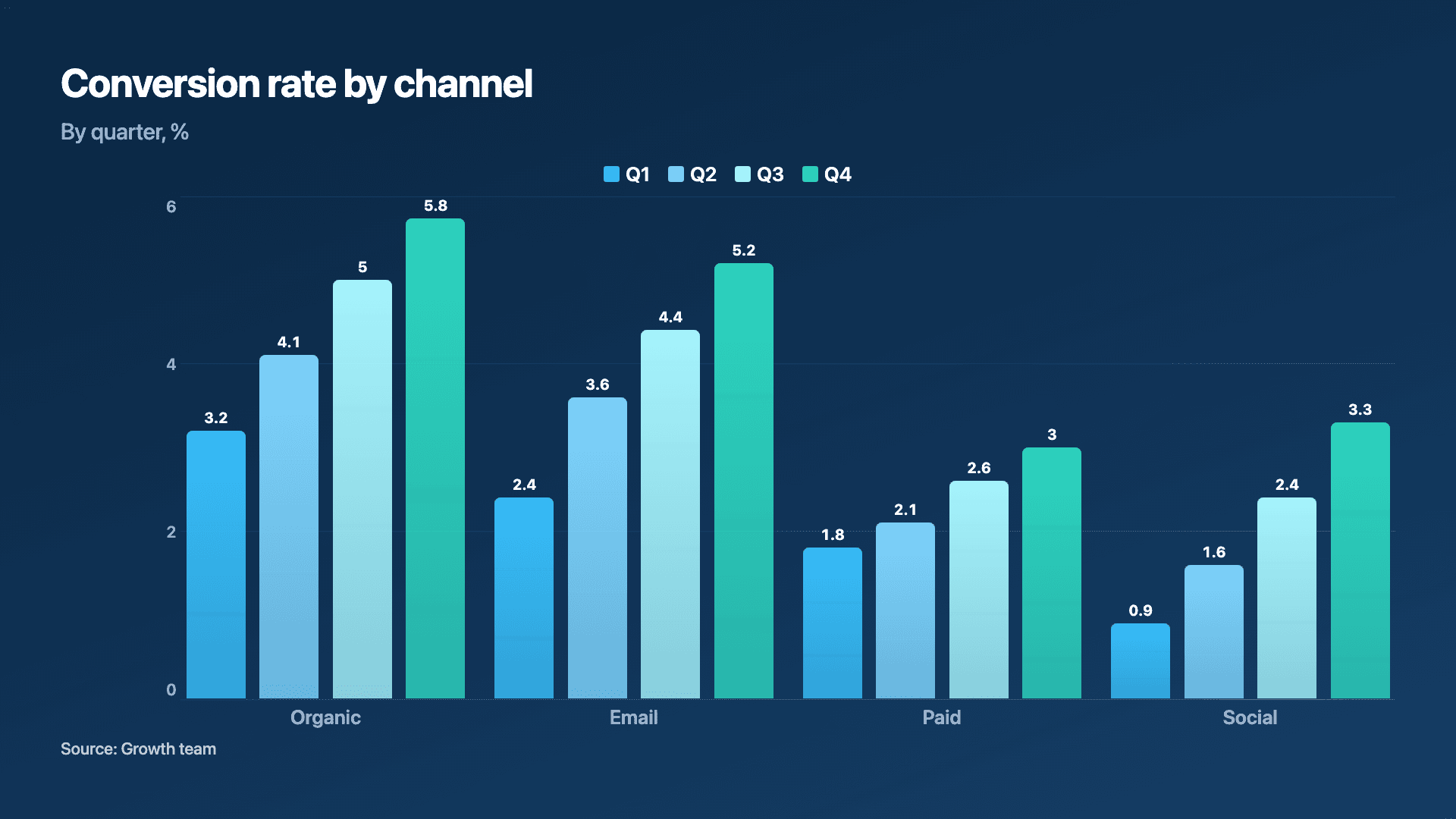
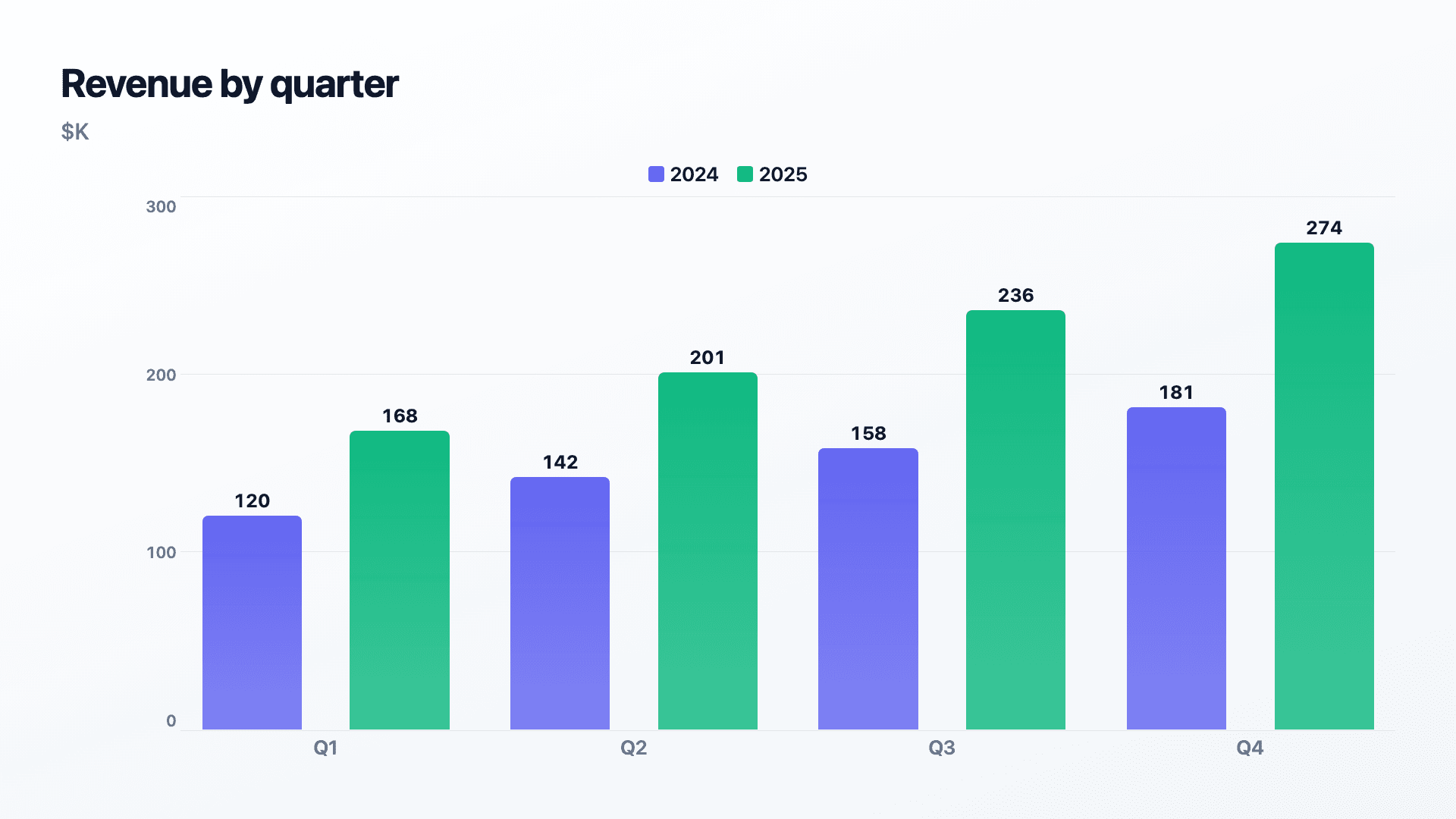
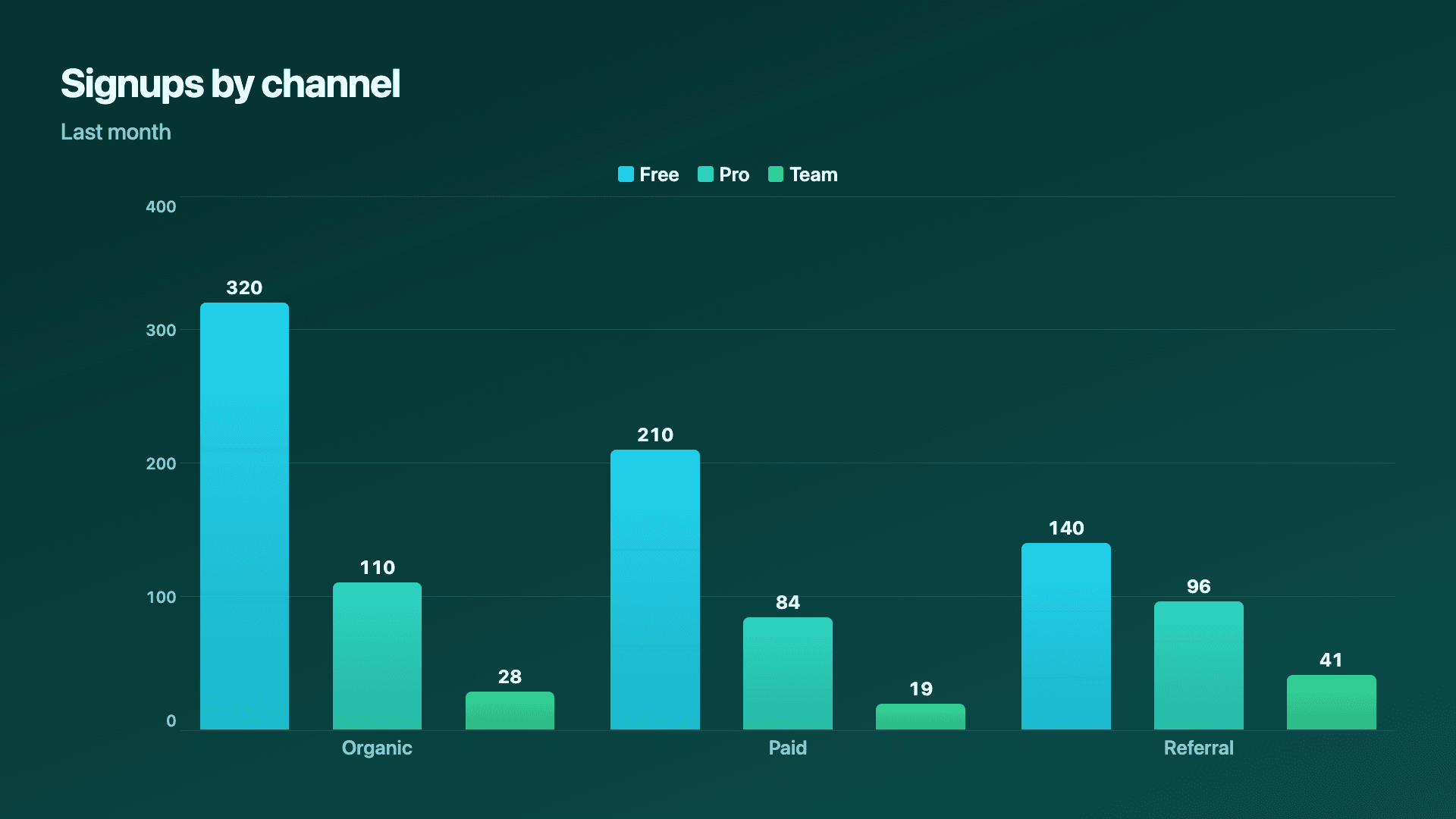
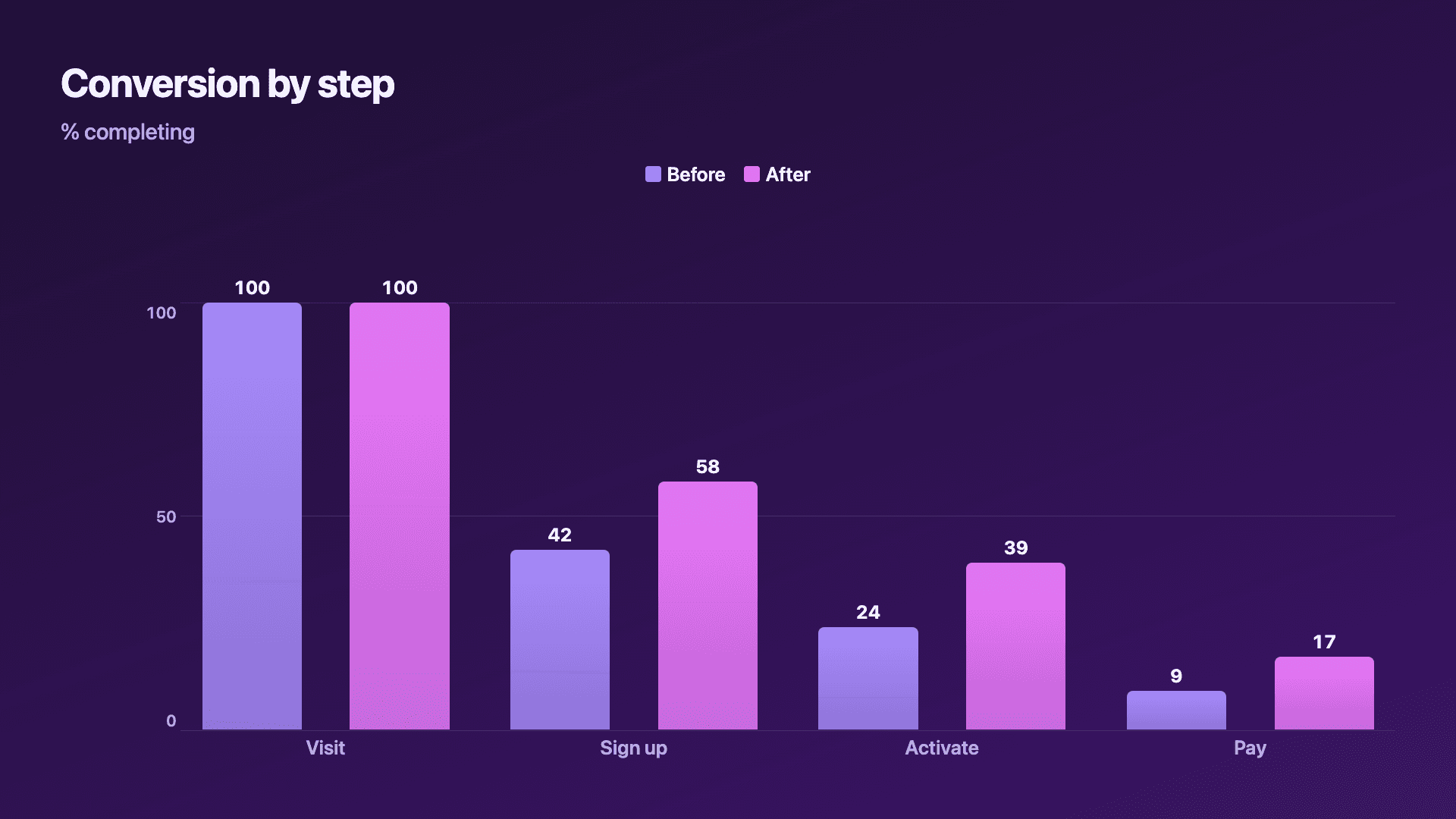
Real charts made in Reochart, each with its own data and theme. They animate automatically as you scroll.
Good fit
When to use a grouped bar chart
- ✓This year vs last year
- ✓Before vs after a change
- ✓A/B test results
- ✓Comparing 2-5 segments across categories
- ✓Plan or tier adoption across groups
Reach for something else
When not to use a grouped bar chart
- ✕The total per category is the story, use a stacked bar.
- ✕You are showing a trend over continuous time, use a multi-line chart.
- ✕You have more than about five series, the clusters get unreadable.
- ✕Each category has only one value, a plain bar chart is simpler.
Compare
Grouped bar vs other charts
Grouped bar vs the alternatives.
| Chart type | Best for | Avoid when |
|---|---|---|
| Grouped bar | Comparing series within each category | The total per category matters most |
| Stacked bar | Total and its parts per category | Comparing the parts precisely |
| Multi-line | 2-5 series trending over time | Distinct, non-time categories |
| Bar chart | One value per category | Multiple series per category |
Your data
What data you need
One row per category, one column per series (add up to five). Name each series, the names become the legend. Paste from a sheet or import a CSV.
| Category | Series A | Series B |
|---|---|---|
| Q1 | 120 | 168 |
| Q2 | 142 | 201 |
| Q3 | 158 | 236 |
| Q4 | 181 | 274 |
Step by step
How to make a grouped bar chart
Drop your numbers in, or import a CSV.
Choose the chart, theme and animation speed.
Tune colours, labels and add your brand.
Download MP4, GIF, PNG or SVG.
Best practices
Get it right
- ✓Keep to two or three series where you can; five is the max.
- ✓Use one consistent colour per series across all groups.
- ✓Start bars from a shared zero baseline.
- ✓Order categories logically (by time or by value).
- ✕Pack in so many series the clusters become unreadable.
- ✕Switch a series' colour between groups.
- ✕Use grouped bars when the total is the real message.
- ✕Truncate the axis so small differences look large.
Watch out
Common mistakes to avoid
Each extra series widens every cluster. Past about five, the side-by-side comparison collapses, split the chart or drop series.
Grouped bars hide the category total. If the sum is what matters, a stacked bar shows it directly.
If a series changes colour between groups, the legend stops working. Lock one colour per series.
Starting bars above zero exaggerates small gaps between series. Keep the baseline at zero.
Why Reochart
Built for sharing, not just charting
- ✓No design skills required
- ✓Animated MP4 and GIF exports
- ✓PNG and scalable SVG too
- ✓Your brand colours and logo (Pro)
- ✓Paste from a sheet or import a CSV
- ✓Presentation and feed ready in minutes
FAQ
Frequently asked questions
What is a grouped bar chart?
A grouped bar chart, also called a clustered bar chart, places two or more series side by side within each category, so every category becomes a small cluster of bars sharing one baseline. Because the bars sit adjacent and start from the same zero, comparing series within a category is direct and precise, which is what the format is for: this year against last year, variant A against variant B, one region against another. It is the correct choice whenever the comparison you care about is between series rather than about their total. If the total per category is the story, a stacked bar communicates that better, since a grouped chart deliberately never draws the sum. Keep it to two or three series and a handful of categories, because a chart of five series across ten categories is fifty bars and stops being readable.
Grouped or stacked bars?
Use grouped bars to compare the series within each category. Use stacked bars when the total per category, and the mix inside it, is the story.
How many series can I add?
Up to five, each with its own editable name and colour. Two or three usually reads cleanest.
How do I enter the data?
One row per category with a column per series. Paste it straight from a spreadsheet or import a CSV (Pro); the series names become the legend.
Can I make it animated?
Yes. Charts animate by default, and you can export the animation as an MP4 or GIF, or grab a static PNG or SVG if you prefer.
Can I export as SVG?
Yes. Pro exports a crisp, scalable SVG vector, alongside MP4, GIF and PNG. Every export renders at 1080p.
Is Reochart free?
Yes. The free plan lets you make every chart type except the animated bar chart race, and export an animated MP4 with a small watermark, no card needed. Pro adds the bar chart race, removes the watermark, and adds GIF and SVG, your brand colours and logo, longer videos and CSV import.
Keep exploring
Related generators
From the blog
Learn more about charts and data storytelling

11 min read
How to Create an Animated Number Counter
A step-by-step guide to building a number counter that actually lands: picking the number worth this treatment, setting an honest start point, adding the context that makes it mean something, and exporting an animated version for a launch post, a deck, or a milestone update.
Read article →

11 min read
How to Build a QBR Dashboard
A practical guide to building the handful of charts a quarterly business review actually needs: the growth number, the bridge that explains it, the pipeline read, the KPI scorecard, and the roadmap for what's next.
Read article →