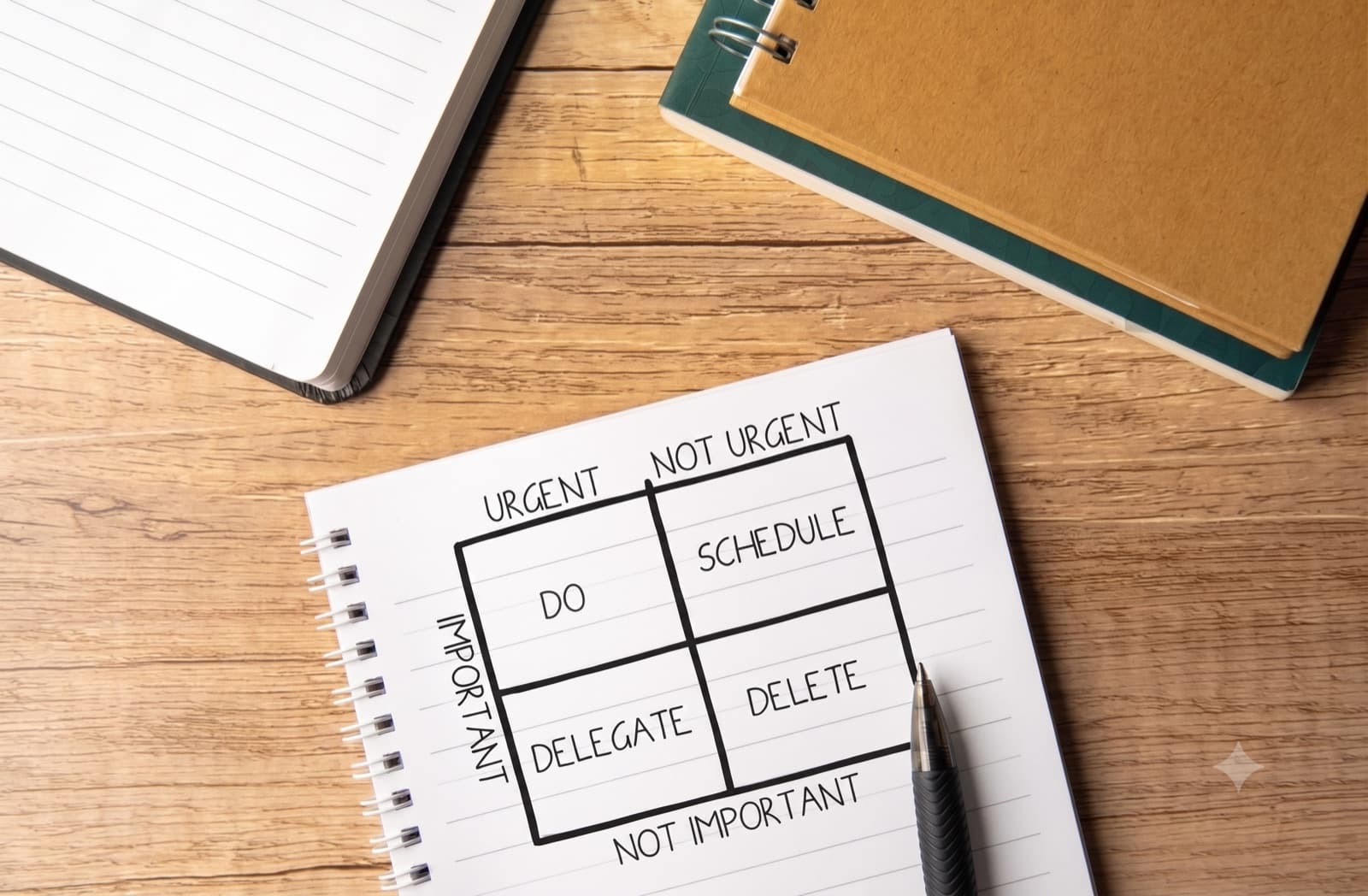
Some debates go in circles for an hour until someone draws two lines on a whiteboard, a vertical axis, a horizontal axis, and starts placing things in the four boxes. Suddenly the argument has a shape. What was a tangle of opinions becomes a picture everyone can point at, and the conversation moves from "I feel like this matters" to "why did you put that in the top-right?" That is the quiet power of the 2x2 matrix: it forces a messy discussion into two dimensions and makes disagreement specific.
You have seen the format even if you have never drawn one. It is the skeleton behind the most recognizable strategy charts ever made, Gartner's Magic Quadrant, which plots technology vendors on two axes; the BCG growth-share matrix of stars and cash cows; the Eisenhower matrix of urgent versus important. Those are proprietary frameworks owned by their creators, but the underlying tool, two axes and four quadrants, is a general technique anyone can use, and it is one of the most effective ways to turn judgment into a clear, defensible picture.
This is a practical guide to building a 2x2 matrix that actually drives a decision instead of just decorating a slide. I will focus on the choices that decide whether it works: picking the two axes, placing your items honestly, labeling the quadrants so they mean something, and exporting a version, animated, that lands in a deck or a post.
What a 2×2 matrix actually shows
A 2x2 matrix plots items against two independent dimensions, one on each axis, dividing the space into four quadrants that each represent a distinct combination of high and low on those two dimensions. Its job is to take a set of things, features, competitors, tasks, ideas, and reveal how they cluster once you judge them on the two dimensions that matter most.
The reason it works is compression. Any real decision has a dozen considerations, but a 2x2 forces you to name the two that dominate and set the rest aside. That is uncomfortable, which is exactly why it is useful: the discipline of choosing two axes is what turns a vague sense of "this is complicated" into a clear "these are our two real variables, and here is where everything falls." The four quadrants then hand you four ready-made stories, the winners, the losers, and the two kinds of trade-off in between.
A 2x2 is the right tool when you are comparing several items on two dimensions and you want to see the trade-off between them. It is the wrong tool when one dimension really does dominate (use a ranked bar chart instead) or when you have so many items that the quadrants turn into a cloud of dots with no clear story.
The famous matrices you already know
The format earned its fame because a few specific 2x2s became the standard way whole industries think, and looking at them shows what a well-chosen pair of axes can do.
Gartner's Magic Quadrant plots technology vendors on "completeness of vision" against "ability to execute," sorting them into leaders, challengers, visionaries, and niche players. It is proprietary to Gartner and famously influential, buyers make real purchasing decisions from it, which is a testament to how much authority a clear 2x2 can carry. The BCG growth-share matrix plots market growth against market share to sort a portfolio into stars, cash cows, question marks, and dogs. The Eisenhower matrix plots urgency against importance to sort tasks into do, schedule, delegate, and delete.
These are worth studying not to copy, they belong to their creators, but to notice the common thread: in every case the two axes are genuinely independent, both matter enormously, and the four quadrants each earn a memorable name. That is the recipe you are reverse-engineering for your own matrix. The framework is free to use even though those particular applications are not.
Step 1: Choose your two axes
This is the entire game. A 2x2 matrix is only as good as its two axes, and almost every weak matrix fails right here.
Pick two dimensions that actually matter. The axes should be the two considerations that dominate the decision. If you find yourself wanting a third axis, that is a sign you have not yet decided which two are most important, and the value of the tool comes precisely from that forced choice.
Make sure the axes are independent. The two dimensions must measure genuinely different things. If your x-axis is "revenue" and your y-axis is "profit," they move together, and every item will fall along a diagonal, leaving two quadrants empty and the matrix pointless. Good axes are things that can vary independently: effort and impact, urgency and importance, cost and value. When items can plausibly land in all four quadrants, you have chosen well.
Orient them so "good" is top-right. By strong convention, the top-right quadrant is the desirable one, high on both dimensions. Arrange your axes so that reads true (impact increasing upward, effort... this is where you decide whether low or high effort goes right, and label accordingly). A reader should be able to glance at the matrix and know which corner is the winner without studying the labels.
Step 2: Place your items honestly
Once the axes are set, you place each item according to where it really falls, and this is where discipline matters, because the temptation to flatter is strong.
Decide whether placement is data-driven or judgment. Some matrices are quantitative, both axes are real numbers, and items sit at their measured coordinates. Others are qualitative, informed judgment about where something belongs. Both are legitimate, but be honest with your audience about which you are doing. Presenting a judgment call as if it were measured data is the fastest way to lose trust when someone disagrees with a placement.
Resist the everything-is-a-winner instinct. The most common failure in practice is clustering all your items in the top-right, because it feels good to say everything you do is high-impact and high-value. A matrix where everything is a winner is a matrix that says nothing. If your honest placement really does put everything in one quadrant, either your axes are wrong (they are not discriminating) or you are not being honest. Spread reflects reality.
Use position within a quadrant, not just the quadrant. An item near the far top-right corner is a stronger case than one barely over the line. Let the exact position carry information, do not just dump everything into the middle of each box.
Step 3: Label the quadrants so they mean something
The four quadrants are where a 2x2 delivers its payoff, and naming them is what turns coordinates into a decision.
Give each quadrant a short, memorable label that says what to do about the items there, not just what they are. The Eisenhower matrix is the model: "do, schedule, delegate, delete" are actions, not descriptions, which is why the framework is so sticky. Your labels should do the same work, "invest," "quick wins," "fill-ins," "avoid" for an effort-impact matrix, for instance, tells the reader the recommendation the moment they see where an item sits.
Keep the axis labels equally clear, and label both ends of each axis where it helps ("low effort" on the left, "high effort" on the right), so no one has to guess the direction. The goal is a chart someone can read correctly in five seconds without a verbal explanation, because it will often be seen without you there to narrate it.
Step 4: Build it and export the animated version
With the axes chosen, items placed, and quadrants named, building is quick. The workflow:
- Open the matrix generator and set your two axes with clear labels at both ends.
- Add your items with their positions, and name each of the four quadrants with an action-oriented label.
- Accent the quadrant or the item that matters most to your argument, so the eye lands where you want it.
- Pick a theme and watch the preview, then export by destination.
The destination decides the format, and an animated export gives a 2x2 a surprising amount of punch:
- A slide deck or report? A crisp PNG works if static, but an MP4 that drops each item into place as you talk lets you build the argument point by point instead of revealing the whole answer at once, which is powerful when you are walking a room through a decision.
- A social feed (LinkedIn, X)? A native MP4 video where items animate into their quadrants stops the scroll, and a sharp 2x2 with a strong point of view is exactly the kind of thing that earns debate in the comments. The LinkedIn chart generator is tuned for this.
- A quick share in Slack or email? A GIF loops without anyone pressing play.
- A doc or page? An SVG stays crisp at any size.
Animating the items into their quadrants does something a static matrix cannot: it lets you control the reveal, so the audience follows your reasoning one placement at a time rather than jumping straight to arguing about the corner they disagree with.
The mistakes that make a 2×2 meaningless
Most weak matrices fail in a handful of predictable ways.
- Correlated axes. Two dimensions that move together, so items fall on a diagonal and two quadrants sit empty. Choose axes that vary independently.
- A vague or vanity third consideration smuggled in. Trying to encode more than two dimensions with color, size, and shape until the chart is unreadable. If a third dimension truly matters, a 2x2 may be the wrong tool.
- Everything in the top-right. Flattering placement that makes every item a winner and the matrix pointless. Honest spread is the whole value.
- Descriptive quadrant labels. Naming the boxes with what they are instead of what to do about them. Action labels make the chart decide something.
- Judgment dressed as data. Presenting subjective placements as if measured, which collapses the moment someone challenges a position. Say which you are doing.
- Too many items. Thirty dots turning the quadrants into a cloud. A 2x2 is for a handful of items you can actually reason about.
A few 2×2 matrices worth copying
Steal these axis pairs and drop in your own items.
The effort-impact prioritization matrix
The workhorse for any team deciding what to build next. Impact on the vertical axis, effort on the horizontal, with quadrants labeled quick wins (high impact, low effort), big bets (high impact, high effort), fill-ins (low impact, low effort), and time sinks (low impact, high effort). Place your roadmap candidates honestly and the quick-wins corner makes the near-term plan obvious. Build it in the matrix generator.
The competitive landscape matrix
The format the famous vendor quadrants popularized. Choose the two dimensions that actually differentiate your market, say breadth of offering against ease of use, and place the players, including yourself, honestly. It is a strong post or sales-deck asset precisely because a clear point of view about where competitors sit invites engagement. Be ready to defend every placement.
The risk matrix
Likelihood on one axis, impact on the other, to sort risks into what to mitigate now, what to monitor, and what to accept. Widely used in planning and operations because it turns a long list of worries into a clear priority order at a glance.
The Eisenhower-style task matrix
Urgency against importance, with the classic do, schedule, delegate, delete quadrants. The cleanest example of action-labeled quadrants there is, and a genuinely useful way to visualize a personal or team workload rather than just a strategy artifact.
The two-minute version
You do not need a strategy consultant or a design tool for any of this. The whole method:
- Choose the two independent dimensions that dominate your decision, the axes are the entire game.
- Orient them so the desirable corner is top-right, and label both ends of each axis clearly.
- Place items honestly, resisting the urge to cluster everything in the winning quadrant, and let position within a quadrant carry meaning.
- Name the four quadrants with action labels, what to do, not just what they are.
- Build it, then export the animated version, an MP4 for decks and feeds, a GIF for quick shares.
- Let the items drop into place one at a time, so your audience follows the reasoning instead of jumping to the argument.
A 2x2 matrix is the fastest way to turn a circular debate into a decision everyone can see. Choose your two axes with care, place things honestly, and let the four corners tell the room what to do.
Bring your numbers to life in minutes. Paste your data, pick a chart, export an animated MP4. No design skills, free to start. Create your first chart free →